 dssub
By Daniel Carter (pen name) · Reviewed November 9, 2026
What is DeepSeek Harness, in one sentence?
DeepSeek's open source agent harness, built on the formula Model + Harness = Agent. The model reasons; the harness connects it to files, a terminal, and a browser. Everything above a small Cordis kernel is a plugin, including tools, skills, the sandbox, and the agent loop.
DeepSeek Harness is an open-source project with evolving releases. Check the version, configuration, model access and costs for your environment before migrating.
Which Hermes habits survive the move?
| Hermes | DeepSeek Harness | What changes |
|---|---|---|
| Profile | Profile + Agent Preset | Harness assembly is separate from the agent a session runs. |
| Goal | Goal + Ralph | Ralph swaps in a fresh agent with a handoff. |
execute_code | PTC / Code Mode | One TypeScript program, one run_code call. |
delegate_task | Subagent + Workflow | Subagents stay addressable; Workflow orchestrates several. |
| Background process | Background Jobs | job_list, job_output, job_kill. |
| Cron | Schedule | Check the installed version, host and missed-run behavior. |
| Skill | Skill | New default directories and an invocation flag. |
| Context management | Compaction + Spill | One guard for huge tool output, one for long history. |
A Profile decides how the harness is assembled; the Agent Preset decides what one session runs: standard, code, minimal, or cordis. That split lets one process hold a standard and a minimal session at once. Goal keeps the same agent going. Ralph ends it, leaves a handoff, and starts a fresh agent with clean context, which is cheaper when a repair loop runs for hundreds of turns. delegate_task becomes Subagent, and you can still call list_agents, send_message, or interrupt_agent afterward. Skills are the easiest port: dsh scans .dsh/skills and .agents/skills.
How should you compare Cron and Schedule?
The two tools have different scheduling and runtime models. DeepSeek Harness scheduling capabilities depend on the selected version, host and configuration. Current documentation describes recurring schedules and catch-up behavior; verify whether your host is running and how missed events are handled before replacing an unattended cron job.
Test a scheduled job across a restart and an offline period in your own deployment. Do not assume either continuous execution or missed-run behavior from a similar-looking schedule expression.
Planning to use DeepSeek in your workflow? Explore DeepSeek Subscription to review plans and usage limits.
What do the rc.6 defaults tell you?
npx -y @deepseek-ai/dsh --profile headless --dump-default-config| Node | Default in rc.6 | What it means |
|---|---|---|
agent.default-model | deepseek-v4-flash | The cheaper model is the starting point. |
permission | workspace-write | Writes stay inside the workspace you opened. |
| Sandbox on win32 | bash off, PowerShell on | Windows gets PowerShell sandboxing. |
telemetry | DISABLED | Usage data stays off unless you enable it. |
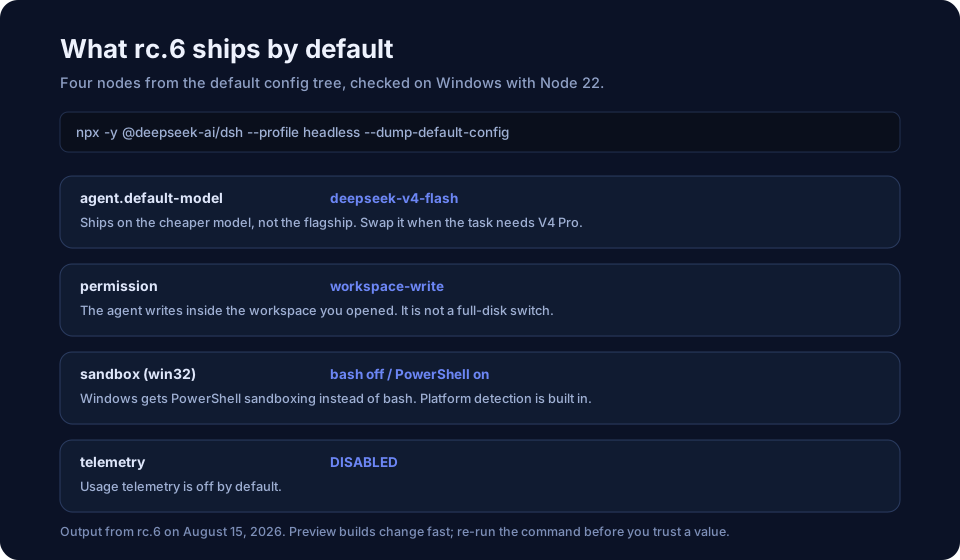
These values describe the original rc.6 snapshot, not the current defaults. Inspect the configuration for your installed version before relying on its model, permissions, sandbox or telemetry settings.
What are the three things you actually relearn?
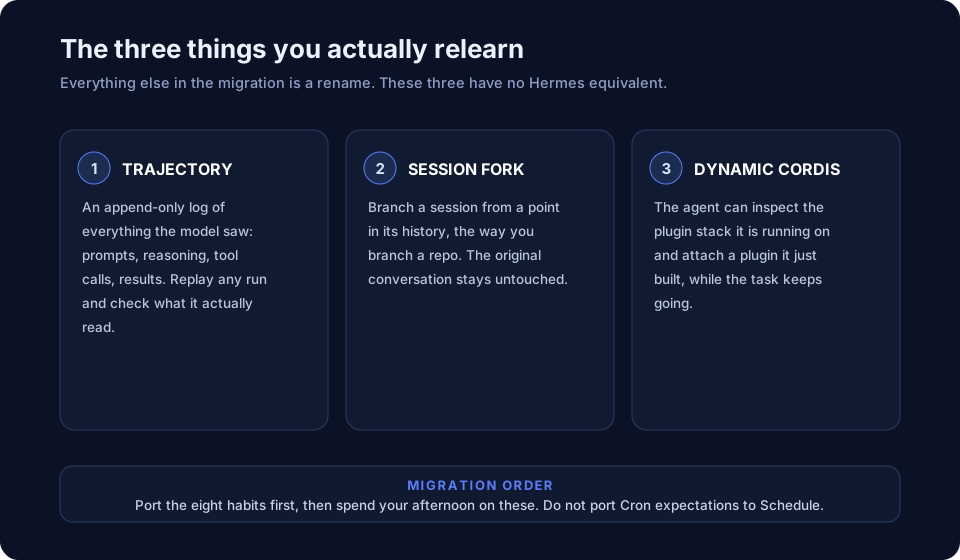
Trajectory is an append-only log of every prompt, reasoning step, tool call, and result. Replay a run and check whether the agent really opened the page or answered from training memory. Session Fork branches a conversation from any point in its history, so a second approach does not touch the original. Dynamic Cordis lets the agent inspect its plugin stack and attach a plugin it just built, mid-task. You will not need the last one on day one.
Is everything-is-a-plugin a strength or a liability?
Both arguments hold. Plugins keep a small core isolated from unpredictable integrations, and they also rot: the first six months look fine, then come version conflicts and abandoned packages. Eclipse and VS Code users know the pattern. dsh adds one new variable, since the agent can write the plugin you are missing.
Setup requirements and performance depend on your version, provider and workload. Budget for model usage and configuration time, and compare tools on representative tasks rather than relying on an unrelated benchmark.
Should you migrate?
If you use Hermes today, map your existing workflows before deciding whether to migrate. Test scheduling, permissions, state and tool behavior in the exact versions you intend to use; keep a backup of your existing setup.